
You know who is trained for which job… before the auditor asks.
The skills matrix in eTWI is linked to the instructions. It is not a separate spreadsheet in a manager’s drawer: the workstation, the instruction and the training live in one system. You create instructions, assign them to people and see who has mastered them. It is an add-on module.
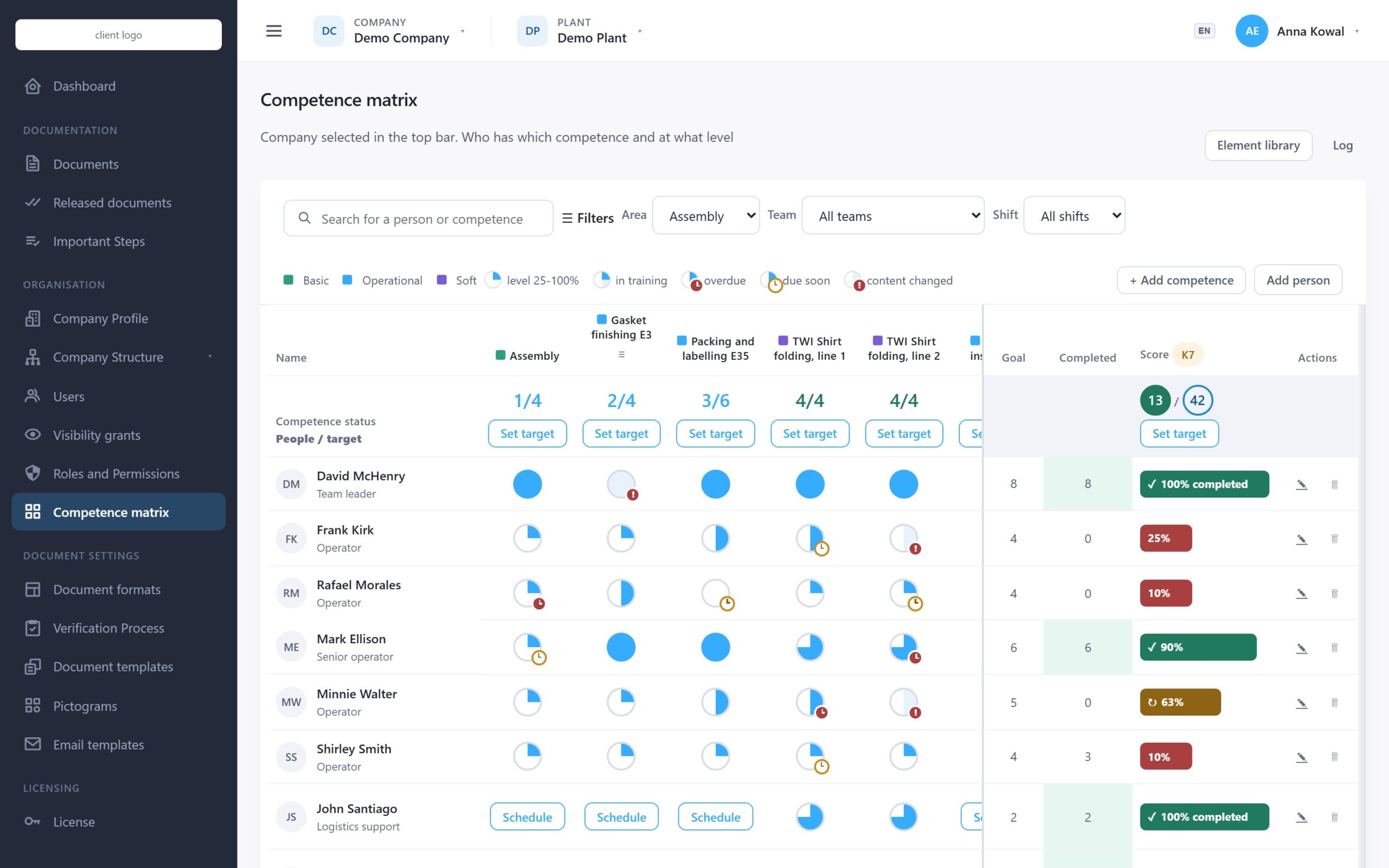
For the manager and team leader: you see gaps before they surface on the night shift
Rows are people, columns are competences. Each person’s level is a circle in quadrants: 25, 50, 75 or 100 per cent, with a lighter quadrant for the level someone is currently gaining. A mark in the corner shows that a deadline has passed, is approaching, or that the training content has changed.
Filters: area, team, shift; search by person and competence
A target number of trained people for each competence and a “people / target” summary
Assign a competence and schedule training straight from the cell
Status is carried by shape and mark, not only colour, so the matrix is legible on a black-and-white printout too
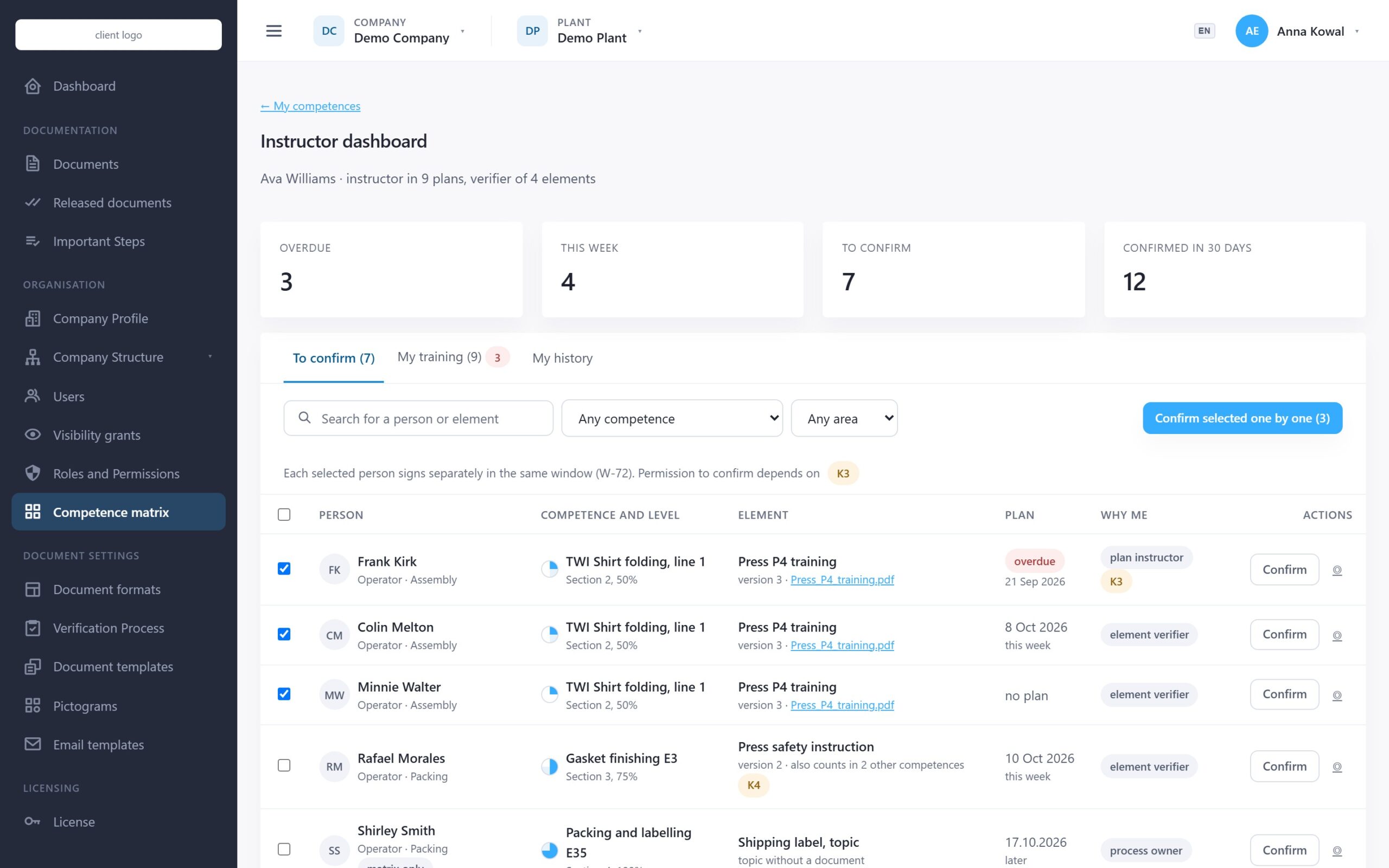
For the instructor: training and confirmations in one place
The instructor has their own dashboard: what awaits confirmation, which training they run and what they have already closed. They see overdue items at once, without an email.
- Tabs “To confirm”, “My training”, “My history”
- Level confirmation signed by the verifier and the employee on a tablet
- Group confirmation: one verifier signature for the whole group, each person signs separately
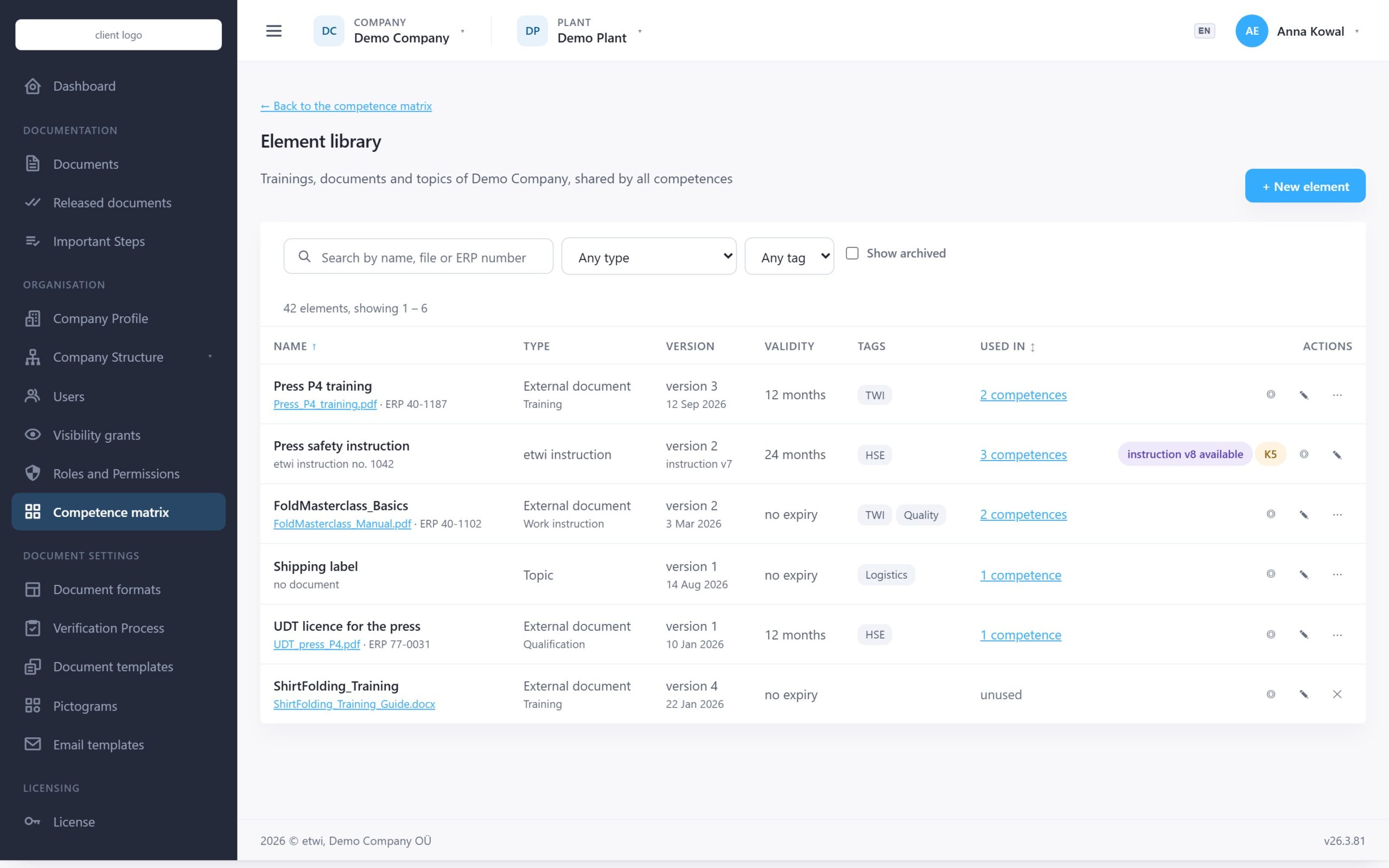
For HR: you build competences from elements you already have
A competence has four levels, and each level is made of elements: an instruction from eTWI or an external document, with a version, a verifier, an ERP number and an expiry date. The elements sit in a library and you reuse them in many competences.
- A competence with a description, an ambassador, a category (basic, operational, soft), tags and a required level
- An element library with versions and a list of places of use
- Before a new version of an element is saved, the system shows how many people and how many competences the change affects
- Production changes and dictionaries are set once for the company
For the employee: see your own path
Everyone sees their own progress: the level of each competence, training, instructor and planned dates. They know what lies ahead and do not wait for word from a supervisor.
- “My competences” with progress in a ring
- A progress card with levels, dates and documents to open
- People without an eTWI account are entered in the matrix as “matrix only”
Instructions and people in one system
A competence element can point to an eTWI instruction together with its version. So you know which instruction someone was trained on, and when the content changes, a mark in the matrix shows it. You create, version and approve instructions in eTWI, and the matrix assigns them to people. Details: Approval workflow and versions.
Statistics and an audit card
For a competence you see how many people it concerns, how many have reached at least 75 per cent, how long it takes on average to reach that level, who completed it most recently and whom we recommend as an instructor. You print a person’s competence card on A4 with signatures. ISO 9001 and IATF 16949 require a company to know what competences the people at its workstations have; the matrix makes that question easier to answer. See eTWI and the requirements of standards.
Questions
What is a skills matrix?
It is a summary showing who is trained to work at which workstation, at what level and at what stage their training is. In eTWI it is linked to the instructions for those workstations.
Will the matrix show who may work at a machine?
It shows who is trained according to your company's criteria. The company decides who is allowed to work.
Is Excel enough for a skills matrix?
As long as one person maintains the matrix and it covers a few workstations, usually yes. When the number of people grows and keeping it current depends on the memory of a few people, a system linked to the instructions is better.
Do I have to use eTWI instructions to use the matrix?
A competence element can be an eTWI instruction or an external document. The combination of both gives the most: one data set instead of two.
Is the matrix included in the base price?
No. It is an add-on module, quoted together with the rest of the system. See Pricing.
See the matrix on your own workstations
We will show it on one of your departments and on your instructions.